Why is changing one line in a Word document so difficult for an AI agent?
“Change the deadline to 18 November. Keep the formatting. Leave everything else alone.”
If you work with proposals, reports or contracts, that is an ordinary request. You should be able to give it to your AI assistant and get a Word document back that your colleagues can continue editing.
Handing that request to an agent that works on the raw file goes wrong in three common ways:
- It spends its context on XML. A
.docxis a ZIP of XML parts, and a one-line change can mean reading thousands of tokens of markup. - It loses things you did not mention. One visible sentence is often split into several XML runs with different formatting, so a plain find-and-replace misses the phrase or flattens the bold. Rewriting a paragraph can drop a reviewer’s tracked change or comment without any error.
- It saves a file Word has to repair. You find out when Word says “We found unreadable content”, and there is no undo.
But knowing what to change is only half the job. The assistant also has to preserve the document around it: the bold phrase in the same sentence, the numbering, the table on the next page, the comments left by a reviewer. And you need a way to check the result and recover an earlier version.
We built ASTra for that workflow. It lets an AI agent, a script or a person create and edit .docx files through one engine: read a short outline, change exactly what was asked, check the result against the Office schema, and keep a history you can undo.
In short. ASTra works on Word (.docx) files and runs on your own machine.
- Create: Markdown in, a styled Word document out, including native charts. Or start from a blank template and build it with typed operations, no Markdown needed.
- Edit: 27 typed operations in all-or-nothing batches, aimed at paragraph and table IDs.
- Check: every save is checked with Microsoft’s Open XML SDK validator. By default a file that already had errors can still be saved; only an edit that adds new errors is refused (strict mode refuses any error).
- Undo: a git-backed history with a preview before you revert.
- Use it your way: from an AI assistant (MCP), from the terminal (
astra), or from your own code (TypeScript).
Why Word files are hard for an agent
A .docx is a ZIP package of XML files, images and relationships between them. One visible sentence can be split into several runs of text with different formatting. Comments, tracked changes, charts, headers and footers add more parts.
An agent that reads all the XML spends its context on markup. An agent that rebuilds the document from extracted text can lose details you expected to keep. ASTra gives the agent an outline and operations on document elements. The agent chooses the change; ASTra handles the document mechanics.
One engine, three ways in
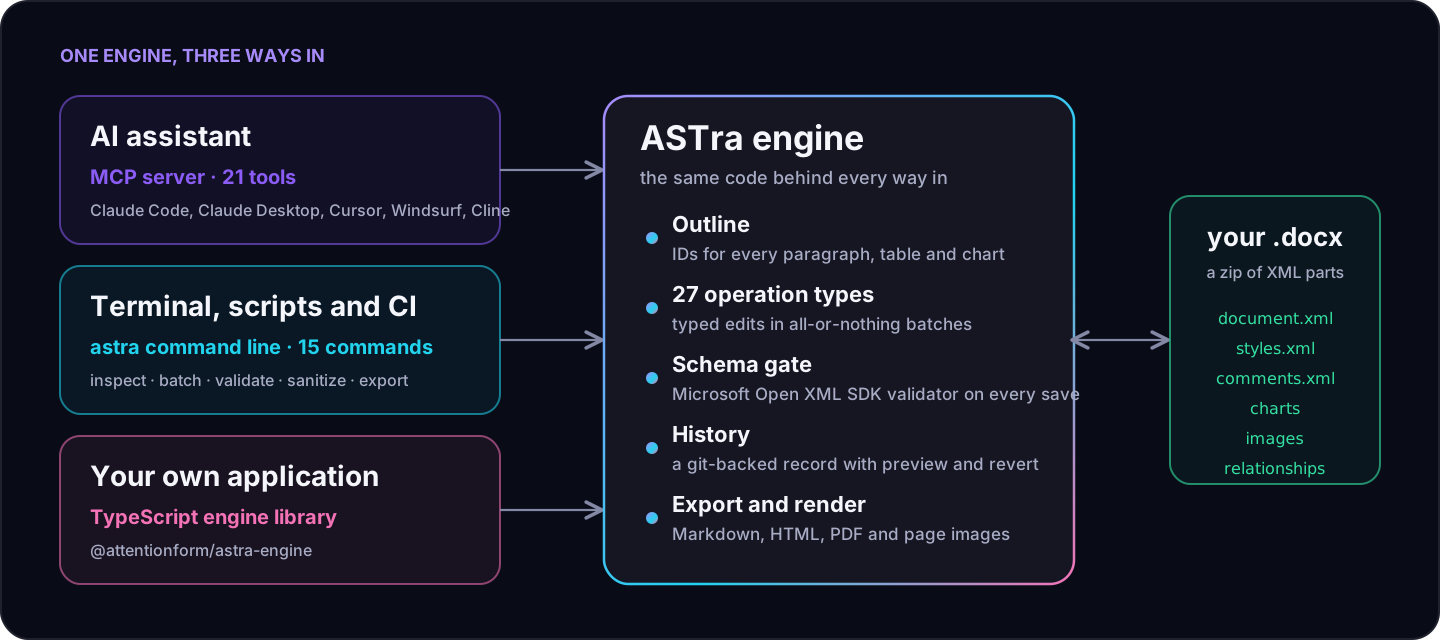
The engine does the work. The three front ends are thin: they call the same code, so a document behaves the same way whichever door you use.
| Way in | Best for | You get |
|---|---|---|
| MCP server | Letting an AI assistant work on your documents | 21 tools for creating, reading, editing, checking, exporting, reverting and recovering the original, in Claude Code, Claude Desktop, Cursor, Windsurf, Cline and other MCP clients |
astra command line |
Scripts, CI jobs and quick terminal work | 15 commands, --json output, exit codes you can branch on, and a dry run that shows a diff before anything is written |
| TypeScript engine | Putting document editing inside your own product | @attentionform/astra-engine: the same operations, as a library, with batches that roll back on error |
What people use it for
These are the jobs we built ASTra around. The command outputs below are copied from real runs, shortened where marked.
| Who | The job | How ASTra helps |
|---|---|---|
| Finance and operations teams | Recurring board packs and monthly reviews | Generate the report from Markdown, with a house style and native charts. Next month, edit the numbers instead of rebuilding the document |
| Legal and procurement | Contract review | Make changes as tracked changes with a named author and leave comments, so a human accepts or rejects each one in Word |
| Sales and customer success | Personalised letters and quotes in bulk | Fill one template from a CSV file: one command, one valid document per row |
| Anyone sharing a file outside the company | Removing internal traces before sending | Accept tracked changes, delete comments, clear author names and metadata, and redact email addresses and phone numbers, in one pass |
| Technical writers and engineers | Specs, runbooks and papers that live in Markdown but have to ship as Word | Headings, tables, code blocks, native footnotes and equations come out as real Word structure, not pasted text |
| Compliance and records teams | The same cover page, header, footer, page numbers or DRAFT watermark on many files | Typed operations for cover pages, headers and footers, watermarks and page borders, applied as one batch per file |
| Researchers and analysts | Reading and searching many Word files cheaply | Read a compact outline instead of XML, search by text, export to Markdown or HTML for indexing |
| Developers building agents | Giving an agent a safe way to work on Word files | Typed operations, clear errors the agent can act on, atomic batches and undo |
| Platform and DevOps teams | Checking and converting documents in a pipeline | Validate against the Office schema, normalise files, export to Markdown, HTML or PDF, and get byte-identical output with --reproducible |
Create: a board report from Markdown
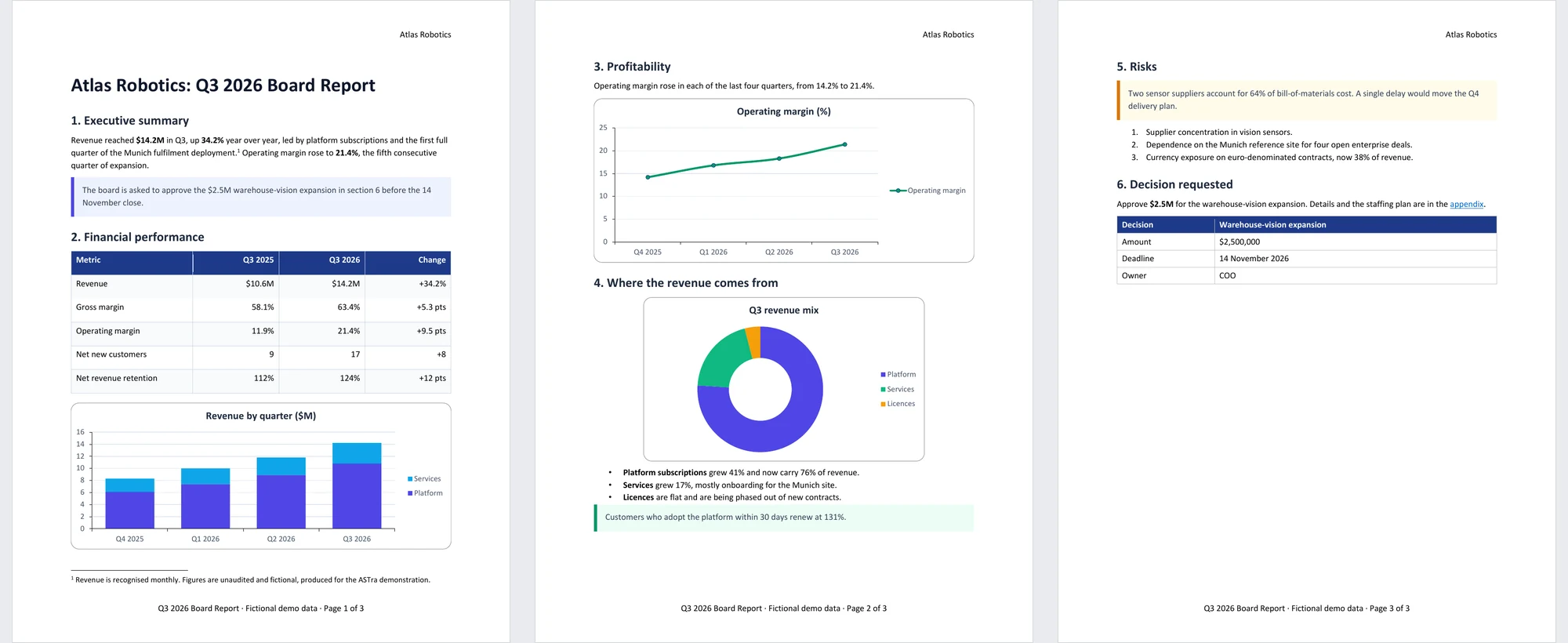
The agent, or you, writes Markdown. Each chart is a small JSON file that the Markdown points to, and a style guide sets the colours and table styling. Below is the real source of the report at the top of the page, up to its first chart. The rest of the file (two more charts, a bulleted list, a numbered list, a warning, a tip and a decision block) follows the same pattern. Download the whole source with the style guide and the three chart files (revenue, margin, mix), and build it yourself.
# Atlas Robotics: Q3 2026 Board Report
## 1. Executive summary
Revenue reached **$14.2M** in Q3, up **34.2%** year over year, led by platform subscriptions and the first full quarter of the Munich fulfilment deployment.[^1] Operating margin rose to **21.4%**, the fifth consecutive quarter of expansion.
> [!IMPORTANT]
> The board is asked to approve the $2.5M warehouse-vision expansion in section 6 before the 14 November close.
## 2. Financial performance
| Metric | Q3 2025 | Q3 2026 | Change |
| --- | --- | --- | --- |
| Revenue | $10.6M | $14.2M | +34.2% |
| Gross margin | 58.1% | 63.4% | +5.3 pts |
| Operating margin | 11.9% | 21.4% | +9.5 pts |
| Net new customers | 9 | 17 | +8 |
| Net revenue retention | 112% | 124% | +12 pts |
This is charts/revenue.json, the chart that the last line points to:
{ "chartType": "columnStacked", "title": "Revenue by quarter ($M)", "categories": ["Q4 2025", "Q1 2026", "Q2 2026", "Q3 2026"],
  "series": [{ "name": "Platform", "values": [6.1, 7.4, 8.9, 10.8], "color": "4F46E5" }, { "name": "Services", "values": [2.2, 2.6, 2.9, 3.4], "color": "0EA5E9" }],
  "widthIn": 6.3, "heightIn": 2.3, "altText": "Stacked columns: revenue by quarter in $M, Platform and Services, rising from 8.3 in Q4 2025 to 14.2 in Q3 2026" }
widthIn and heightIn give the chart’s size in inches and altText is the description a screen reader reads, so the size is set when the chart is created.
The other two are a line chart ("chartType": "line") and a doughnut ("chartType": "doughnut"), each in its own small file.
The three charts are native Word charts with their data embedded as a workbook, not pictures.
What comes out
This is the file as astra create writes it. You can run the command yourself, call it through the MCP server, or use the engine from code. You or your agent write the Markdown, and this is what comes out, with no further formatting:
astra create q3-report.docx --from-md report.md --style-guide report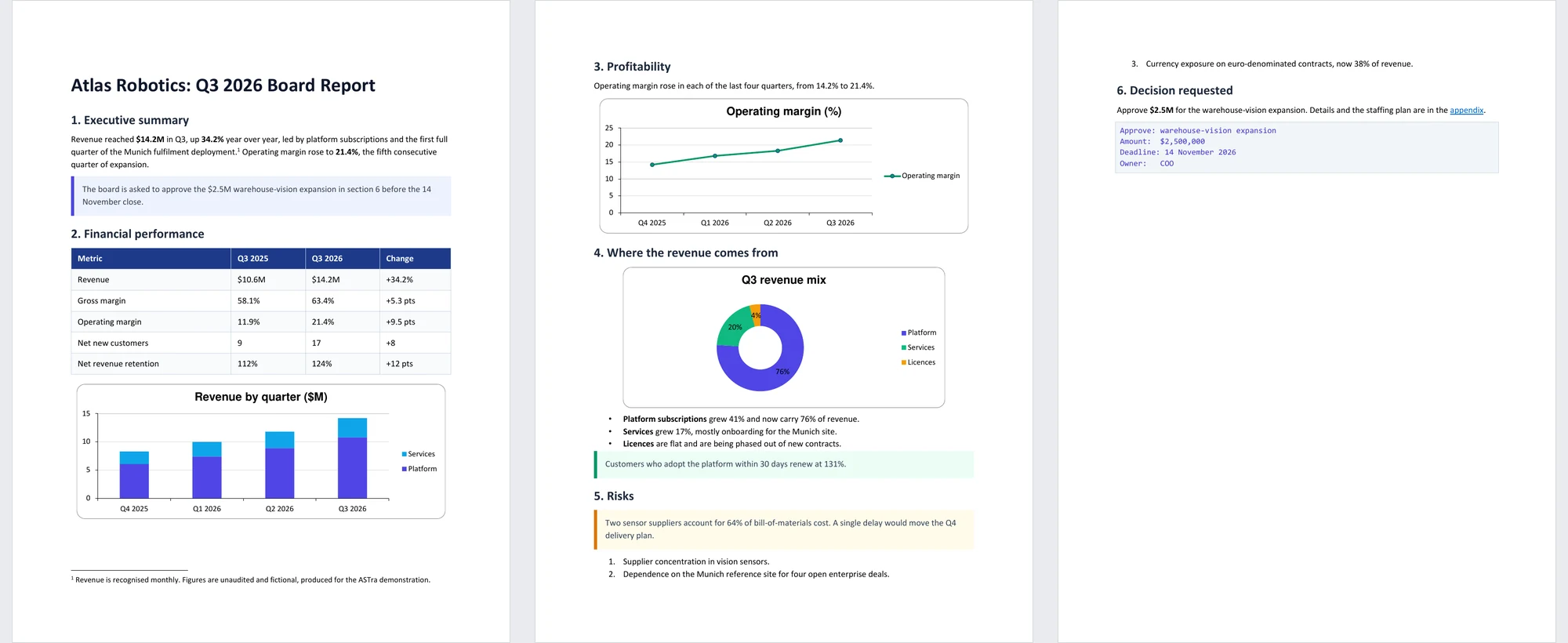
Changing the look
If you want something different, ask your agent: right-aligned numbers, another chart size or colour, more room around the headings, a table in place of the code box, a footer with page numbers. Or make the same changes yourself with astra batch. Below is the same file after we asked an agent to improve the formatting. The result depends on which AI you use and on your instructions, so yours will differ.
Download this file and the file straight from Markdown. The operations this agent sent are here too: layout and decision table. Run them in order with astra batch. The second file is separate because the decision table gets its id only after the first batch has been saved.
Create without Markdown
Markdown is one way in, not the only one. A new document starts from a template (blank, report or memo), and everything after that is the same set of typed operations used for editing. An agent or a script can build a document from nothing, piece by piece, without writing a line of Markdown:
astra create memo.docx --template blank
astra batch memo.docx ops.json
[
{ "action": "insert", "type": "paragraph", "anchor": "end", "position": "after",
"text": "Office move: Monday 3 March" },
{ "action": "insert", "type": "paragraph", "anchor": "end", "position": "after",
"text": "The Berlin team moves to the fourth floor over the weekend. Badges work from 7:00." },
{ "action": "headerFooter", "operation": "set", "targetType": "footer",
"text": "Page {PAGE} of {NUMPAGES}" }
]The same operations also cover tables, lists, charts, images, equations, callouts, footnotes and endnotes, cover pages, watermarks, page borders, hyperlinks and bookmarks, and document properties. Through the MCP server, the tool new_document creates the file and execute_batch applies the operations, in the same all-or-nothing batches and with the same schema check on save. In our benchmark, 15 of 15 recipes built this way, on a blank template with operations alone (tables, merged cells, an image, a callout, a chart, an equation, a footnote, a header and footer, a section break and more), were saved with the intended structure and passed all five independent checks.
Edit: a contract review with tracked changes
Here is a one-page Master Services Agreement created the same way (astra create msa.docx --from-md msa.md --style-guide legal). An assistant reviews it for the customer. Two of its changes go in as tracked changes, and two points go in as comments for a lawyer. This is the whole instruction, a file of four operations:
{ "operations": [
  { "action": "replace", "target": "3763CE83", "trackChanges": true,
    "text": "The Customer will pay each invoice within forty-five (45) days of the invoice date. Fees are stated in the applicable Statement of Work and exclude taxes." },
  { "action": "replace", "target": "6186E856", "trackChanges": true,
    "text": "The Supplier's total liability under this Agreement is limited to the fees paid in the twenty-four (24) months before the claim arose." },
  { "action": "comment", "operation": "insert", "target": "04DF062D",
    "text": "Check: our standard notice period is 90 days. Raise with the Customer before signing." },
  { "action": "comment", "operation": "insert", "target": "483E9DAC",
    "text": "Five years is longer than the NDA signed in March (three years). Confirm which applies." }
] }
Before anything is written, --dry-run shows what would change:
$ astra batch msa.docx review.json --author "Contract assistant" --dry-run
DRY-RUN OK msa.docx -> msa.docx (would apply=4 affected=4 would-be normalized=0, writes nothing)
--- a/3763CE83 (before)
+++ b/3763CE83 (after)
- The Customer will pay each invoice within thirty (30) days of the invoice date. ...
+ The Customer will pay each invoice within forty-five (45) days of the invoice date. ...
--- a/6186E856 (before)
+++ b/6186E856 (after)
- The Supplier's total liability ... fees paid in the twelve (12) months before the claim arose.
+ The Supplier's total liability ... fees paid in the twenty-four (24) months before the claim arose.
(Output shortened.) Run without --dry-run and the file is changed. Open it in Word and the redlines are ordinary tracked changes. Only the words that changed are marked, not the whole sentence.
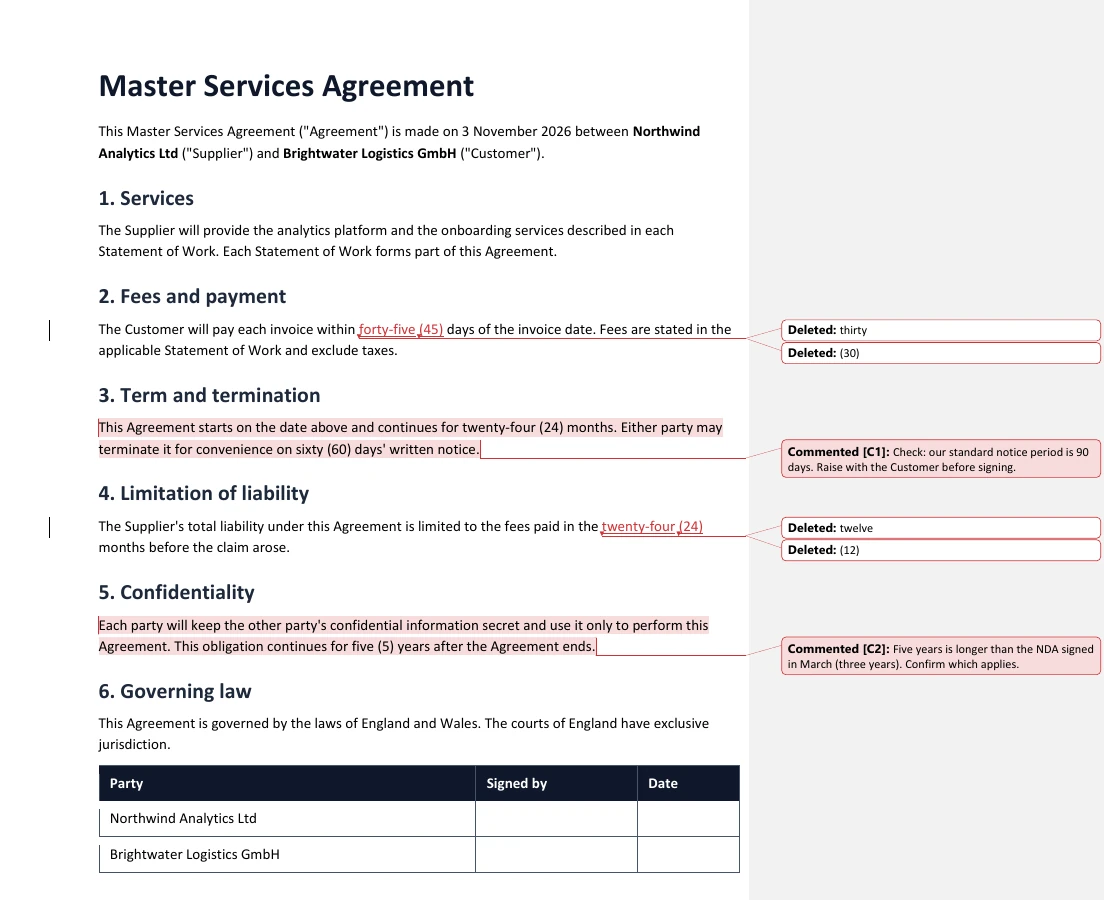
When the review is done, the changes can be accepted or rejected in Word, or through ASTra: the trackedChange operation has acceptAll and rejectAll, and accept or reject for chosen changes (by id, author or paragraph).
{ "operations": [ { "action": "trackedChange", "operation": "acceptAll" } ] }Before the file goes to the other side, one command clears the internal traces:
$ astra sanitize msa.docx msa-for-client.docx --client-safe
SANITIZED msa.docx -> msa-for-client.docx (rsids=0 authors=14 exifBytes=0 pii=0 ...)
$ astra validate msa-for-client.docx
VALID msa-for-client.docx
In the sanitised file the tracked changes are accepted, the comments and the comment authors are gone, and the file still passes the schema check.
Check and undo: the safety loop
Every edit, whichever front end sends it, goes through the same loop.
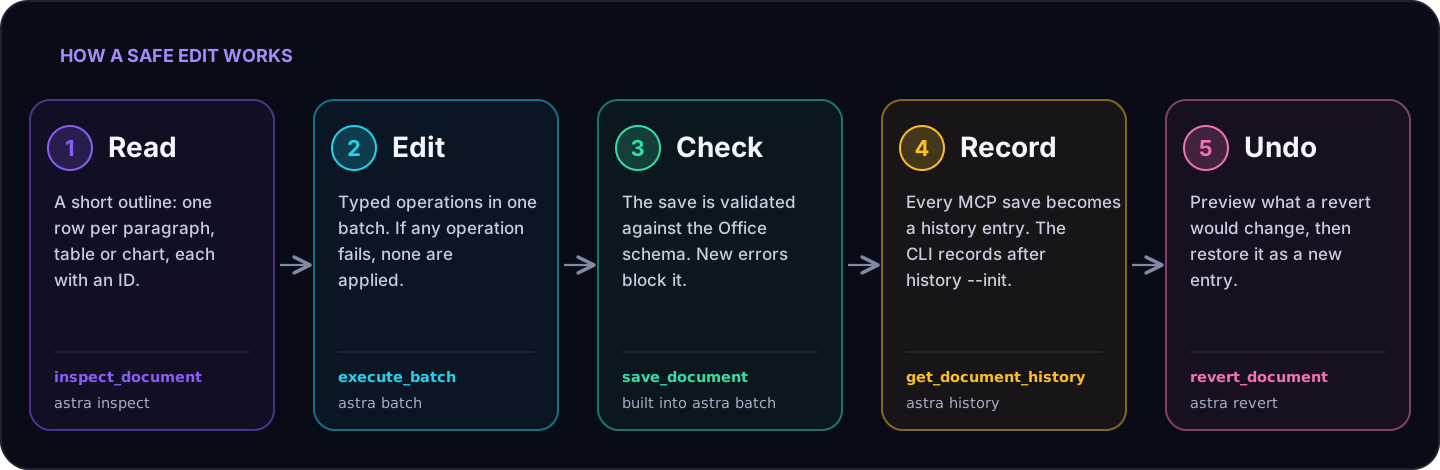
Edits are all or nothing. We sent a batch of four operations whose third one named a paragraph that does not exist. The batch was refused, and the outline read back afterwards was identical to the one before it:
E_VALIDATION: execute_batch failed: Error: Node ZZZZZZZZ not found in ASTImpossible values are refused at the call. Ask for a paragraph colour of banana and the call is refused before the batch runs. The message names the field and lists the forms it accepts: six hex digits, auto, or one of ten colour names such as red or grey. Colours, highlights and sizes that no writer can use used to pass this check and fail after the whole batch had run, with a raw XML message.
Bad files are refused at save time. Everything that gets past the call is checked again when you save, against the Office schema. If an edit makes the file worse, the save is refused and the agent gets the first errors with their locations:
E_VALIDATION: save_document blocked: this edit adds N validator error(s) (the file already had M): <description> <xPath> ...The file on disk is untouched. By default ASTra lets you keep working on a file that already has errors (for example one re-saved by another program) and blocks only the edit that makes it worse. Strict mode refuses any error at all. How well does this catch problems? See the measurement below, including where it falls short.
Every save can be undone. Through the MCP server, each successful save is recorded as a history entry, and if the entry cannot be written the save is refused. On the command line you switch recording on once with astra history --init. A revert is a new history entry, so nothing is rewritten and you can undo the undo:
$ astra history msa.docx --init
HISTORY INIT msa.docx: recorded baseline 7b2179c (9 tracked package files); 1 commit.
$ astra batch msa.docx review.json --author "Contract assistant"
BATCH OK msa.docx -> msa.docx (applied=4 normalized=0)
$ astra preview-revert msa.docx
PREVIEW-REVERT msa.docx: steps=1 -> 7b2179c "Initial state" (ASTra; 2 recorded commits)
  affected package files (7): word/document.xml, [Content_Types].xml, docProps/core.xml, ...
  working file: clean at head 49a1465 — a real revert would proceed
$ astra revert msa.docx
REVERT OK msa.docx: restored 7b2179c "Initial state" (steps=1); new commit 84ed021
(Output shortened.) A revert puts back every part of the package exactly as it was saved, not just the visible text.
Look at the page
An agent that can see the page catches a table that spills over or a heading left alone at the bottom. visual_inspect (and astra visual) draws a page as an image, and export --format pdf writes a PDF. On Windows, ASTra uses Microsoft Word when Word is installed and falls back to LibreOffice if Word fails. On Linux and macOS it uses LibreOffice. A program you name is never replaced by another one.
By default a render draws no comments. --show-markup (showMarkup in the MCP tools) draws tracked changes and comments, so a reviewer can see the redlines in the image. The output then shows reviewer names and deleted text, so check it before you share it.
Two things to know. Word and LibreOffice lay a page out differently, so page breaks can move between them. And the Word checks were done on one Word build on one machine, so treat a page image as a check, not as proof of how Word shows the page. Before a render, ASTra also neutralises network references in the document (a linked image, a template, a field that fetches a file) on the copy it renders, so drawing a page does not contact the network by default. If you want those references loaded, you can allow it: --allow-network-references on the command line (or the environment variable ASTRA_ALLOW_NETWORK_REFERENCES), allowNetworkReferences: true in the MCP tools. Only do that for a document you trust: loading a network location can leak information, for example a Windows login hash through a UNC path.
On the command line
The astra tool is the engine without an AI in the middle. It suits shell scripts, CI jobs and anyone who wants to see exactly what changes. Every command accepts --json. Exit code 0 means success, 1 an operational failure and 2 a usage error, so a script can branch on the result.
| Group | Commands |
|---|---|
| Read | inspect (an outline at three detail levels), search, stats, visual (a page image) |
| Create | create and import (from Markdown, with a template and a style guide) |
| Edit | batch (an operations file, a one-line shortcut, --dry-run, --backup, and --matrix for one document per CSV row) |
| Check and clean | validate, normalize, sanitize |
| Convert | export to Markdown, HTML or PDF |
| History | history, preview-revert, revert, redo |
Here is the bulk-letters job. A renewal letter is the template, and a CSV file holds three customers. One command makes three letters:
file,customer,renewal_date,plan,annual_fee
brightwater,Brightwater Logistics GmbH,18 January 2027,Platform Plus,"EUR 48,000"
harbourline,Harbourline Shipping Ltd,2 February 2027,Platform Core,"GBP 21,500"
meridian,Meridian Foods SA,9 March 2027,Platform Plus,"EUR 36,400"
$ astra batch letter.docx merge.json --matrix customers.csv --out "out/{{file}}.docx"
BATCH OK letter.docx -> out/brightwater.docx (applied=3 normalized=0) [matrix row 1]
BATCH OK letter.docx -> out/harbourline.docx (applied=3 normalized=0) [matrix row 2]
BATCH OK letter.docx -> out/meridian.docx (applied=3 normalized=0) [matrix row 3]
MATRIX OK letter.docx (rows=3)Each row starts from the untouched template and is applied as its own atomic batch, and all three files pass astra validate. This is the second letter:
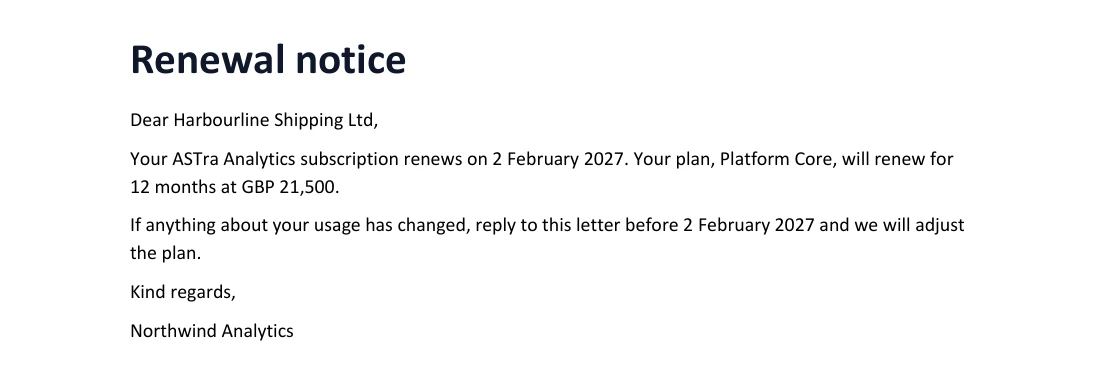
Placeholders like {{customer}} are plain text substitution. There are no loops or conditions, and an unknown placeholder fails before anything is written.
As a library
The engine is a TypeScript package, so a product can edit Word files without an AI and without a subprocess. Batches roll back on error here too. This script is the example we ran:
import { DocxParser, OperationEngine } from '@attentionform/astra-engine';
import fs from 'node:fs';

const parser = new DocxParser(fs.readFileSync('msa.docx'));
const ast = await parser.getAST();
const engine = new OperationEngine(ast, parser);
const payment = ast.sections[0].nodes.find((n) => n.metadata.text.includes('thirty (30)'));

// Both operations apply, or neither does.
const bad = await engine.executeBatch({ operations: [
  { action: 'replace', target: payment.id, text: 'The Customer will pay within sixty (60) days.' },
  { action: 'replace', target: 'no-such-node', text: 'x' },
] });
console.log(bad.success); // false, and the payment clause is still "thirty (30)"

// A tracked change, attributed to a named author.
const good = await engine.executeBatch({ operations: [
  { action: 'replace', target: payment.id, trackChanges: true, author: 'Contract assistant',
    text: payment.metadata.text.replace('thirty (30)', 'forty-five (45)') },
] });
console.log(good.success); // true
fs.writeFileSync('msa-edited.docx', parser.rezip());
We ran it. The first batch failed and left the clause unchanged. The second applied, and astra validate accepts the file it wrote.
With an AI assistant
Connected over MCP, an assistant gets the same capabilities as tools. You do not call them yourself. You ask for the result:
Open the copy of the services agreement in this folder. Change the payment terms from 30 to 45 days as a tracked change, and add a comment on the notice period asking us to confirm it against our standard. Save it, then show me what would change if we reverted.
Behind that, the assistant opens the file, reads the outline, sends one batch, saves, and asks for a revert preview. The save gate and the history work the same way as above. Setup for Claude Code is one line:
claude mcp add astra -- npx -y @attentionform/astra-mcp-server --allowed-dir "$PWD"--allowed-dir is the only folder the server may read and write. Point it at a folder of copies. The Connect page has setup for Claude Desktop, Cursor, Windsurf and others.
Charts, tables and files from other programs
These are the things people open Word for after the text is right. Details and runnable examples are in the charts and tables guide.
- Charts you can size, restyle and restructure. A chart is inserted at a size you give in inches, with alt text. Later calls add or remove series and change among column, bar, stacked and percent types in place, so the formatting the file already has stays. Anything that would mean writing the chart again (column to pie, for instance) is refused until you pass
allowRebuild: true, and the answer then lists what the rebuild dropped. Titles, fonts, gridlines, bars, lines, fills and single-point colours have their ownstylekeys. - Tables with a width and row heights.
setTableWidthtakes inches, percent of the text width or twips, and scales the columns to match.setRowHeightssets a minimum or an exact height. - Files from other programs. Some programs write Word files with their own namespace prefixes. These used to fail in odd ways. ASTra now rewrites the prefixes in memory when it opens a file, checks that the rewritten XML keeps the namespaces and structure it understands, and tells you what it did. The saved bytes can differ from the input. In the files we tried, the page looked the same in Word and LibreOffice before and after an edit, though page breaks can differ between the two.
- Safer clean-up and limits. A chart or picture that an edit leaves unreachable is removed from the file. Zip size limits now also apply to a workbook stored inside a chart, and
sanitizereads single-quoted attributes, so a file written that way no longer keeps author names.
We checked these with the Open XML SDK, with LibreOffice, and by opening files in desktop Word. They are not part of the benchmark below.
What we measured
Claims need numbers. We built a corpus of 40 documents with a script, so they are synthetic and the generator is public. We ran ASTra 0.5.3 against it on GitHub-hosted machines, from the 0.5.3 release commit built on the CI machine (not the package downloaded from npm). The protocol was written before the first measurement.
| What we checked | Result |
|---|---|
| Edits that changed the content of no other paragraph | 1,047 of 1,047 |
| Output files that passed five independent checks (zip, XML, relationships, PDF export, document reader) | 1,132 of 1,132 |
| Rejected batches that left the document unchanged | 108 of 108 |
| Reverts that restored every package part exactly | 300 of 300 |
| Originals recovered byte for byte, before and after an edit | 40 of 40 |
| Documents created from Markdown whose blocks an independent reader found, in order | 26 of 26 (6,602 of 6,602 blocks) |
| Median time to save a 100-page document | 1.38 s |
| Median time to apply a 500-operation batch | 0.61 s |
- The five independent checks are zip integrity, XML parsing, relationship consistency, a LibreOffice PDF export and a Python document reader. None of them contains ASTra code.
- Of the 108 rejected batches, 72 were refused by the engine and 36 by the tool’s input check before the engine ran.
- Timings are tool times on a shared cloud machine. They leave out the model’s thinking time and any PDF rendering. The 500-operation figure is mostly a fixed cost per call: a batch of one operation took about the same time.
- Timings depend on the cloud machine and change from run to run. Treat them as the order of magnitude, not a promise.
- The page renderer is not part of this benchmark. Neither are the charts, tables and page-layout controls, or files that use other namespace prefixes.
Three more results, with their limits:
- Outline size. The outline was a median 2.89 times smaller than the document XML, counted in tokens. That means: for each document we counted the tokens in its
word/document.xmland the tokens in the outline the agent reads, and divided the first by the second. The median over 40 documents is 2.89. Across the 40 documents it ranged from 1.7 to 25.6 times. By document type, the median was 2.2 times for list-heavy documents and 6.4 times for the one wide-table document. - Catching bad files. We injected 158 faults from 60 fault classes into three valid generated documents, with a script we wrote. The schema check flagged 129 (81.6%), or 86.3% if you leave out one class of cross-reference faults that the schema validator does not examine. Another 14 faults, all element-order problems, were put back in schema order by the save-time normaliser and written valid. 15 were not flagged. It raised no false alarms on 58 valid control files. These are our own invented faults, so the number says little about damage in real files.
- What a revert restores. A
.docxis a zip of parts (text, styles, comments and so on). After a revert, every part was identical to the saved version in all 300 tested reverts. Only the zip wrapper around the parts is written again (timestamps, entry order, compression), so a hash of the whole file can differ from the one you saved. If you need the exact original file, byte for byte, use the stored original: it came back identical in 40 of 40 cases.
ASTra is at an early stage and changes every day. We add features and work on these limits continuously, so these numbers and these limits will move. The goal is for ASTra to become the default way for AI agents to create and edit documents in automation work. Feedback, suggestions, bug reports and contributions are welcome: open an issue, or read the contributing guide if you want to send code.
The 0.5.3 summary has every number above. The protocol, corpus generator and raw results are public on a dedicated branch (they are not part of the released package), so you can rerun them or add your own documents.
Limits worth knowing
These limits describe version 0.5.3. They are not permanent: we are working on several of them, starting with one writer per document, and expect them to change.
- Word only. ASTra works with
.docxfiles. It does not edit other formats. - A valid file is not a correct document. The schema check tests structure. It does not prove that your figures are right or that every page looks right. Review important documents, and use
visualorexport --format pdfto look at pages (see “Look at the page” above for what they need). - Your files first. The first time ASTra saves a file written by another program, it rewrites some parts and adds paragraph IDs. The text does not change. ASTra also keeps the exact original next to the document when its history is first created, and can give it back byte for byte (how that works). That stored copy is not a backup, so start with a copy of anything that matters.
- One writer per document. If two processes save the same file at the same moment, an edit can be lost (in a deliberate stress test on one setup, both edits survived in 0 of 30 trials). Give each document to one agent at a time, or give each agent its own copy. Editing one file with several agents is what we are building next: edits to different paragraphs merge, and edits to the same paragraph are reported as a conflict.
- Your AI client sees what it reads. ASTra’s own code makes no network calls. The assistant you connect still sends the content it reads to its model provider.
- History takes space. After 50 saves, the history folder was about 1 MB for a 5-page document, 3 MB for a 50-page one and 7 MB for a 100-page one.
- Other tools go further in places. We do not claim to cover everything Word can do. ASTra aims to do the editing and checking of Word documents well, and to be honest about where it stops.
Questions people ask
Can an AI agent edit a Word document without losing formatting or tracked changes? ASTra is designed to preserve formatting and tracked changes during targeted edits, because it edits the document’s elements and not its text. Review the result on your own files. ASTra changes the paragraph you point at. In our corpus, an edit changed the content of no other paragraph in 1,047 of 1,047 cases. The XML of the whole file is rewritten on the first save, so the bytes are not identical. That is a count on generated documents, so try it on a copy of your own files.
Do I need Microsoft Word installed? No. ASTra reads and writes .docx files itself. You only need a renderer (LibreOffice, or Word on Windows) if you want page images or a PDF.
Will Word open the file ASTra saves? Every save is checked against the Office Open XML schema with Microsoft’s Open XML SDK validator. By default a file that already had errors can still be saved, and a save that adds new errors is refused; strict mode refuses any error. A valid file is not a correct document, and passing the schema check does not guarantee that Word opens it without a message, so open important files and look.
Does the document leave my machine? In normal use ASTra works on local files and makes no network calls of its own. The AI assistant you connect it to sends what it reads to its own model provider, and a document that links to an external resource can make a renderer fetch it.
Which assistants work with it? Any client that supports MCP servers over stdio, including Claude Code, Claude Desktop, Cursor and Windsurf. The Connect page has the setup for each.
Is it open source? No. It is source-available under the Business Source License 1.1, with the free-use terms below.
Try it
You need Node.js 22.19 or newer.
# Terminal: no install needed
printf '# Hello\n\nThis is my first ASTra document.\n' > hello.md
npx -y @attentionform/astra create hello.docx --from-md hello.md
npx -y @attentionform/astra inspect hello.docx --fidelity compact

# AI assistant (Claude Code shown)
claude mcp add astra -- npx -y @attentionform/astra-mcp-server --allowed-dir "$PWD"

# Your own code
npm install @attentionform/astra-engine
Start with a copy of a document you know well. Ask for one precise edit, open the result in Word, then try a tracked change, a comment and a revert.
ASTra is source-available under the Business Source License 1.1. You can use it for free in production if you are an individual, work in education or research, a non-profit or a public-sector body, a small organization (under USD 250,000 in revenue and ten people or fewer), or you build a small product (under USD 250,000 in revenue from that product). Larger internal use and products at scale need a commercial licence, and so does anything that competes with ASTra. Each version becomes Apache-2.0 four years after its release. Pricing and the licensing page explain who needs what in plain words.
We want to hear about the documents you actually work with: the template you cannot replace, the review history you need to keep, the recurring report that takes too long to update. Open an issue or join us on Discord.
Try ASTra. Connect it to your AI assistant in about a minute, or read how it works.
Found a mistake, or a document where ASTra fails? Open an issue.